How to UNINSTALL Windows 7 Activation Update: KB971033 and REACTIVATE with SP1
Last Updated on Monday, 29 December 2014 10:53 Written by Naota Thursday, 25 February 2010 01:48

Wanna hear more about the Windows 7 KB971033 Update? Installed Windows 7 SP1 and need to activate? You have come to the right place! Scroll down below for additional information on how to update and reactivate.
Read the Windows 8 Consumer Preview Review here!
I have also written how to re-activate your Limewire Pro License Key if you lost it with the latest version here.
*Updated 2/23/11* – Windows 7 SP1 Has been released so we went ahead and updated the steps.
For those of you who installed the Microsoft Windows 7 Activation Checker update (KB971033) you can still uninstall it. The reason that viewers such as you may want to uninstall it, is because of the surround rumors that this update creates a new process/service that will slow down your system and has been rumored to monitor the user. If you haven’t installed this, you can hide and prevent the Microsoft Windows Update Windows Activation Checker (KB971033) from installing by using the directions below.
 |
|
Many of you, including Windows 7 SP1 users, need to use the EASY METHOD listed below. That is 100% guaranteed working.
1A. If you installed KB971033 Remove the patch using the steps below.
1B. If you installed SP1 and not the patch,go to step two.
2. Follow the easy method below (Windows Loader 1.9.7)
3. After that, restart your computer
4. You should be done. If not.. continue
5. Click the activation prompt to follow the official steps to validate your windows
6. Click the option to download the Microsoft file to re-validate your windows
7. The activator will detect your Watt 2.25 key and will act accordingly (this takes up to five minutes)
8. Reboot
9. Do a windows update check and hide that damn update! (If installed KB971033)
10. Try rearming windows afterwards if that didn’t work.
=====
To Hide the Windows Update/Disable it From Ever Installing KB971033 or SP1 (But why?!):
1. Go to Windows Update
2. Click to View Your Critical Updates
3. Right Click the one Labeled “Update for Windows 7” with update ID “KB971033” or SP1
4. Click “hide update.”
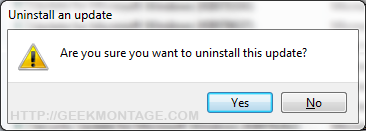
Uninstall KB971033 Windows 7 Activation Checker
For those of you who HAVE installed it and want to uninstall it
1. Go to Windows Update
2. Hit Installed Updates (link at the bottom left corner). If that link isn’t there, hit “view update history” and hit the “installed updates” link at the top.
3. Scroll down to the section titled “Microsoft Windows” and look for update KB971033.
4. Right click it and hit “uninstall”. Hit okay.
5. Reboot
6. Now check for updates again and follow the above method to hide it from installing ever again!
Note: You can also do a system restore if you are worried.
I have verified this method myself and did it before publishing this article. I personally do not want any extra processes running on my computer. =)
Enjoy!
If you are flagged as having an Un-Genuine copy of Windows 7:
Steps that I recommend
1. Remove the patch using the steps below.
2. Follow the easy method below (Windows Loader 1.9.7)
3. After that, restart your computer
5. Click the activation prompt to follow the official steps to validate your windows
6. Click the option to download the Microsoft file to re-validate your windows
7. The activator will detect your Windows Loader 1.9.7 key and will act accordingly (this takes up to five minutes)
8. Reboot
9. Do a windows update check and hide that damn update!
10. Try rearming windows afterwards if that didn’t work.
=====
Rearm Windows:
1. Copy down these instructions into notepad and save it to your desktop.
2. Go to start -> hold shift and click run (If you do not see run, simply type run in the start menu’s search box and click it while holding shift)
Note: Holding shift while clicking run opens up run in administrative mode, which is necessary for this process.
3. Type in “command” or “cmd” and press enter.
4. In the command prompt window type or right click -> paste:
slmgr.vbs -rearm
10. Reboot and your good to go~!
Sponsored:
Reactivate Windows – Easy Method (easiest and guaranteed working): If you need to re-activate your windows, it has been reported that Daz’s activator works. You can easily find it on web pages. Just type “Windows Loader 1.9.7 into Google.
- After that, restart your computer, then follow the official steps to validate your windows. Microsoft will prompt you to install a file which will then legitimize your windows with the new loader.
We will NEVER post those files here and we do NOT support this. We highly encourage you to activate your windows through Microsoft by buying it.
From here on you can even go legitimize yourself in the future at Microsoft’s website. It doesn’t take long at all. You will already be legit though.
Method of Removing Genuine Activation Message
1. Copy down these instructions into notepad and save it to your desktop.
2. Go to start -> hold shift and click run (If you do not see run, simply type run in the start menu’s search box and click it while holding shift)
Note: Holding shift while clicking run opens up run in administrative mode, which is necessary for this process.
3. Type in “command” or “cmd” and press enter.
4. In the command prompt window type or right click -> paste:
takeown /f “%windir%\\System32\\Wat\\*”
5. Press enter
6. Type or right click -> paste:
icacls “%windir%\\System32\\Wat\\*” /deny *S-1-1-0
7. Press enter and reboot.
NOTE: This method has worked for some people but not others.
Method of Inputting Your Legitimate Product Key
Step 1. Right click My Computer and click Properties
Step 2.Scroll down to wher eit lists your current product key
Step 3.Hit “Change Product Key”
Step 4.Insert your new product key there
Step 5.Reboot Your Computer
If you have changed your Windows Key and want to re-validate:
1. Go to start -> hold shift and click run (If you do not see run, simply type run in the start menu’s search box and click it while holding shift)
Note: Holding shift while clicking run opens up run in administrative mode, which is necessary for this process.
2. Type in “command” or “cmd” and press enter.
3. Type the following or right click -> Paste:
%SystemRoot%\\system32\\Wat\\WatAdminSvc.exe /run
4. Hit enter and reboot.
If you need to update your bios OEM serial key:
1. Go to start -> hold shift and click run (If you do not see run, simply type run in the start menu’s search box and click it while holding shift)
Note: Holding shift while clicking run opens up run in administrative mode, which is necessary for this process.
2. Type in “command” or “cmd” and press enter.
3. Type in the following command:
slmgr -ipk XXXXX-XXXXX-XXXXX-XXXXX-XXXXX
Remove Windows Activation Notification Mode
1. Go to start -> hold shift and click run (If you do not see run, simply type run in the start menu’s search box and click it while holding shift)
Note: Holding shift while clicking run opens up run in administrative mode, which is necessary for this process.
2. Type in “command” or “cmd” and press enter.
3. Type the following or right click -> Paste:
takeown /F %WINDIR%\\System32\\sppcomapi.dll && icacls %WINDIR%\\System32\\sppcomapi.dll /deny *S-1-1-0:F
4. Hit enter and reboot
Note: You can re-enable this by typing:
icacls %WINDIR%\\System32\\sppcomapi.dll /grant *S-1-1-0:F
Remove the WatU scheduled key checker:
1. Go to start -> hold shift and click run (If you do not see run, simply type run in the start menu’s search box and click it while holding shift)
Note: Holding shift while clicking run opens up run in administrative mode, which is necessary for this process.
2. Type in “command” or “cmd” and press enter.
3. Copy and right click-> paste the following into command prompt:
schtasks /change /disable /tn “\\Microsoft\\Windows\\Windows Activation Technologies\\ValidationTask” && schtasks /change /disable /tn “\\Microsoft\\Windows\\Windows Activation Technologies\\ValidationTaskDeadline”
Delete WAT Registry Entries
Windows Activator logs all kinds of stuff about you… this is how to delete those logs.
1. Go to start -> hold shift and click run (If you do not see run, simply type run in the start menu’s search box and click it while holding shift)
Note: Holding shift while clicking run opens up run in administrative mode, which is necessary for this process.
2. Type in “command” or “cmd” and press enter.
3.Right click -> paste the following into command prompt:
REG DELETE “HKLM\\SOFTWARE\\Microsoft\\Windows NT\\CurrentVersion\\Windows Activation Technologies” /f
We will NEVER post those files here and we do NOT support this. We highly encourage you to activate your windows through Microsoft by buying it.

[…] the update already? You can uninstall the Windows 7 Activation Checker KB971033 here. […]
I tried doing that and i doesn’t work. The best thing is just by a stinking operating system or reenstall the original. Stop being so cheap!!
@theone23 yes same for me too, even i uninstall the update and reboot, window still prompt me on “this window is not genuine”. Is there any solution to solve our case ? Thanks !
Hi
HAVE installed it Try the next it works.
disconect from internet.
Firts copy the instructions
now open the MSDos (CMD) as an administrator.
in the cmd window write the following
takeown /f “%windir%\System32\Wat\*”
press enter
next write:
icacls “%windir%\System32\Wat\*” /deny *S-1-1-0
press enter and restart your pc with the internet conection active
t lest for now it works
Any coments at *email deleted to prevent spam to user*
[…] with many machines. Do not worry though, it is very easily removed. Simply follow the instructions how to remove / delete KB971033. Enjoy being no longer annoyed by the update! Hopefully Microsoft won’t be as sneaky about it […]
Guys, uninstalling KB971033 only works if your windows haven’t been flagged as not genuine
KB971033 WATu and activation CLI Commands
http://forums.mydigita1llife.info/threads/16541-KB971033-WATu-and-activation-CLI-Commands?s=a06e414a6d2d7c1aaabe309519563d5a
If your Windows 7 still says “not genuine” and has a black desktop, do this:
1. google or torrent-search for “RemoveWAT”.
2. download said file
3. run said file
4. reboot
5. your desktop is still black, chose another background by rightclicking on desktop
6. ???
7. profit!!!
I get Invalid Parameter after I put in
“icacls “%windir%\System32\Wat\*” /deny *S-1-1-0”
Yeah, I’ve already been flagged as invalid so none of this is working for me either…
RemoveWAT21 worked.
check my blog post for download link.
Thanx so much …. This is amazing fix…200% working…
RemoveWAT works 100% but how to activate copy later? Status is unkonwn.
@everyone who says this doesn’t work:
You have to do this before they find out that your copy isn’t genuine. If it already says that, then your screwed, and you HAVE to reinstall your operating system.
I seriously just bought mine after that shit.
Thanks to vicky’s post all is well.
[…] fix your problem. But, if you can't risk losing the data now here is what I suggest. Follow this guide to fix your current situation. You will have to uninstall the update, reboot, download the program […]
After the update flagged mine, I used DAZ 1.7.7 to update the license, etc., then went to MS own site, the one you can click on to “Get Legit” when the warning pops up. I then ran their own activation repair tool and revalidated… no more nags.
Doing what abcedarian says worked for me 🙂
hey guys….no need to worry….if at all ur windows give’s u a trouble wid tht activation shit,then try dis…
(New_Windows_7_Activator_[2010]_[blaze69])
i am using this n its works great….
*note* message edited by admin as we cannot directly link this. Thank you for your information. We have edited the page to reflect it.
Thanks a bunch 🙂
is what abecedarian suggested we do a trap? is it a legit solution?
no , i link it is, but Im wondering if its a trap if we actually click it and do it. no body wants the MS monster going after us
Guys this article isnt working for me, I tried blaze’s activator and Daz. none of them are working. My windows still says its not genuine when I look at the status/system screen.
I tried the Daz and the Blaze activator rebooted but when i goto my computer and properties it still says i need to activate? Is this normal? do i just run RemoveWAT? shouldnt it say its activated?
HELP GUYS HELP PLZ im runing windows 7 build 7600. Someone help! plz plz plz.
my system32 folder doesnt even have a WAT folder .
Hey this guide doesnt work! I tried both activators, No go!
I am proud to say that the steps by abecedarian works! If u installed the update that flags ur copy of WIndows, install Daz’s 1.7.7 loader, restart, the genuine warning would come back up, just go thru the steps to get genuine, it will take u to the validate webpage. Install the software, run it and click continue of the webpage below and u should see that u are genuine!
abecedarian’s method works…
i ran wat2.1 then used daz’s and go thru the steps to validate. voila.
thanks alot.
save me the hassle of reformatting
man… thank u very much, its very impressive, solved my problem 🙂
abecedarian’s method works…
Great guys u all should follow this mathod. Ur copy will be activated. Guys do it 1st before MS people take action on this method. I don’t think that there is trap. U may get some notice during this process but wait for minute or so and ur copy will be activated.
Thanks buddy….!!!!!!
my pc restarts every 2 hours, does this fix help this problem? thanks in advance!
Kid, that means you have the Windows 7 RC (Release Candidate) and the only solution for that is to obtain a full copy of Windows 7, unless there something out there to allow further usage of this early release version.
I do have installed the BIE version integrated october. I have been flaged so i unninstaled the update k971033 and did use the removewat 2.2. Just booted and so far so good.
i have the same problem as kid, re-boots every 2 hours. my version is 6.1.7600 Build 7600, so i don’t think this is the RC version – i installed it as the RTM 7600 version 64-bits. on my system status page it shows that windows is activated and i have the genuine microsoft logo – but it still re-boots every 2 hours starting 1 March 2010. any ideas on what i might try to stop it from re-booting all the time?
maam, If you have subscribed to TechNet or MSDN, and activated your RTM version from there, it should not be giving you this problem unless it becomes unlicensed. If it was not through TechNet or MSDN, then know that “Windows 7 RTM does not accept Windows 7 Beta product keys nor Windows 7 RC product keys.
Hi all…
I just got Windows Genuine problem after install KB971003. But now i already solved this problem. What i’ve done:
1. Uninstall KB971003
2. Install removeWAT V2.2
now i can use nice background again 😀
my question is:
am i still need to install DAZ 1.7.7 (and validate it through MS website) if i already installed WAT V2.2?
Is there any minus things if i just use removeWAT 2.2?
I’m sorry for my poor english…
I hope someone can answer my stupid question 🙂
hi Theodore,
I did the same thing. But u can restore the WAT 2.2v and then do the things as mentioned previously.
if i was flaged, And i just uninstall the that update and ran Wat 2.1 and rebooted, am i good to go with get system updates and stuff or is there anoher stuff i need to do?
does windows stop getting updates if systems are found non genuine or flagged?
does windows keep getting system updates regardless of status?
U guys r the BOMB, thanks Vicky RemoveWat from your blog did the trick, so far so good! YOU ALL ROCK BIG TIME! That thing was sooo annoying
The commands to rearm Wimdows 7 as stated in the article didnt work for me.
I used:
slmgr.vbs -rearm
In an cmd promt with Elevated rights.
Cheers
But that doesnt really does the trick 🙁
Still getting BSOD’s with “END_OF_NT_EVALUATION_PERIOD”
Anyone has an idea?
i couldn’t seem to follow the “rearming windows” instructions above. do i really need to do that to start with? it says above that i need it in conjunction with the whole activation thing. i really think the flow of instructions above are frustratingly unclear and confusing. i couldn’t know what flow to follow (the easy method, the underlined/bold/uppercased ones blah blah blah..) anyway i’ll try the instructions posted in the comments now.
@daedalus
slmgr.vbs -rearm worked for me. thanks a bunch!
okay so now what? so far the only instructions i followed and worked is the remove genuine notification. both the “remove WatU scheduled key checker” and “delete WAT registries” yield errors in the command prompt. i haven’t done anything in the activation part yet.
i got it working (i think..) all i did was remove/block the update, rearm windows (command given by Daedalus) and remove windows activation notification mode. i was about to try and download the removeWAT21 from Vicky’s blog until i checked my system status. weird enough it’s already reverted back to being “Windows is Activated”. so i guess i’m done(?) or do i still need to run removeWAT21 and do the official ms activation steps listed above?
thanks a lot, it really works…
In my system properties it says i have 30 days evaluation left, but sometimes i also get an pop-up saying i have 0 hours left.
And about 30 min after that pop-up im getting the BSOD.If i just could get rid of the BSOD for about 30 days that would be very nice as im planning on buying Windows 7 Ultimate.
So i think there are two timers running, one for system properties and one for that pop-up i get.
Hi all, i used WAT 2.2 and now i have no serial number at all. ( did i do it right ). The message has gone on the bottom right, but i dont know if its still activated or not…Is there something i am missing?
Thankyou in adavance
Where it says this microsoft product is activated is gone and i dont what to do next..please help
You should be fine arnold.
For those that installed the WAT 2.2V what this does is that it only eliminates that message and lets u put a wallpaper, but your w7 will not remain genuine.
this is what u do.
1. Restore ur system to a date before the KB971033 install.
2.Disconnect any internet connection u may have. “yes, wireless and wired”.
3.Re start your PC.
4. Uninstall any loader u may have used to activate ur copy of W7.
5.Clean registry (CCleaner or tuneup U.)
6. Search and download “Windows 7 Loader V.1.7.7 by Daz”.
7. Install loader.
8.OPTIONAL. “Search for the KB971033” Hacked file download it, install it and ull have Ur Windows 7 Geniune activated with the KB update.
It does work, so try it. and then thank me. 😀
Vicky’s link works perfectly. Thanks!
It Worked Just Fine
Actually companies such as Engadget suggest that this update adds additional services that run in the background on your computer. Because of that, lots of people have uninstalled it just because they don’t like the idea of additional processes, especially when these processes constantly connect to the Internet and update themselves. =)
Here is an article that states additional services may be added by installing the windows update: http://www.engadget.com/2010/02/11/windows-7-activation-technologies-update-coming-down-the-pike/
Just a quick correction: KB971033 was listed under “Important” updates, not “Optional” — maybe Microsoft has change it since these instructions were written.
does anyone know how to stop microsoft essentials telling me i’m not genuine, i guess i updated it and it tells me i have 30 days left for the security stuff. any help would be appreciated and if anyone is having the same problem. everything worked find after doing removeWAT 2.2, but i must have downloaded an update and now it’s back to telling me i’m not genuine. thanks for your help.
Does anyone have the problem after doing removeWAT 2.2, working fine; after doing updates for microsoft essentials, the old NOT GENUINE is back and you have 30 days left for the security stuff (security patches, i think). You all are pros at this and i know someone has the answer. Thanks in advance!
Hey I used 7loader Release 5 to activate my Windows it came with a WAT 2.1 which I did after I Activated it like it said.
I did however install the KB971033 now I am flagged as not genuine windows copy, If I system restore back to the time I installed the update my computer doesnt get the messege but if I restart it does HELP ME!
Also if I restart I get the black screen desktop if I leave it after the restore its my normal wallpapper that I picked
thanks.
seems it worked.
you helped me a lot.
:))
Touchdown! I fiddled with this for three days before I read this. Installed Win7 ultimate over Vista Home, updated to the deadly trojan KB1033. Uninstall trojan, ran Mr. Hazar’s removeWAT.2.2.5. Rebooted, and no more ‘genuine’ messages. Thank you!
Does anyone know how to get rid of the “Get Genuine” in Microsoft Security Essentials? It’s telling me I have a few days left because Windows 7 is not genuine. I don’t have that nagging ‘not genuine and changing desktop’, as WAT2 took care of that, but the security features will stop working shortly. Thanks for any help you can give me.
Hi
I just installed WAT 2.25 and looks like my windows is activated again(even with the evil upadate installed)
Is the others steps really necessary?
Hi all, i used WAT 2.2 and now i have no serial number at all. The message has gone on the bottom right, but i dont know if its still activated or not…Is there something i am missing?
am i good to go with get system updates and stuff or is there anoher stuff i need to do?
This trick worked for me like a charm
I got the validation messages too and I can assure everyone that the RemoveWAT program worked for me!!
THANX! THANX! THANX!
I was really worried 😉
Me I’m Using Windows 7 Loader 1.7.6 latest
and the update (KB971033) It did not flag my system even if I have the real DVD of windows 7 premium. I remove the update just in case but I still will see if my computer do a weird behavior but I don’t think for now. I’m using Asus.
Worked perfect for me, TY.
This tutorial works great, no problems whatsoever. The key to this is to find and download RemoveWAT 2.2.5.2 by Hazar. This is found on the forums of My Digital Life.
Thank you to the Author.
-ls
worked perfect!
I have the same problem as Jacee. My Microsoft Security Essentials still says “Get Genuine” & when I clicked it, it said that it did not pass the genuine test. Is there a fix for this?
***Ola Nordmann***
is the man …download removewat …work like a charm …thanks alot ola
thanks mate works, for all those having trouble, the one that worked for me was “Remove Windows Activation Notification Mode”, hope it works for you 😛
guys lemme tell you how thankful i am to all you guys for taking care of my annoying “get genuine” problem, and the black desktop that comes with it…also gotta thank blaze69,hazer,and orbit30 for their incredible endeavor…where would we be without ’em? thanx a ton guys…and thanx geekmontage
btw..i forgot to mention-it was the “new windows 7 activator [2010] [blaze69]”,that did the trick for me…just run the loader…reboot…remove wat…easy as 1-2-3…now i got a gleaming red ferrari convertible as my wallpaper,and that’s the way it’s been for the past few weeks.you guys have been life savers.
Hey guys, if you are still having trouble search for “Windows 7 Ultimate NOT GENUINE” on you tube. You can get DL link for the Remove WAT 2.2.5 proggie.
Didn’t post the link to help with S.E. tracking it down, but hope this helps everyone out.
Using remove wat, uninstalling the update and hiding worked like a charm for me.
Works beautifully!
Many Thanks!
I only have a ~version~ of windows because the one I own is 64 bit but as we all know, there are 9999 bugs with 64 bit so I have a version for 32 bit, but damn windows reenabled updates. I never have them to automatically, and it keeps on changing it to automatically every month or so.
I generally hate MS, because they think I will want to buy it if they take away all user control. If games were made for Linux, even though I’ve never used Linux before, I would drop windows immediately. It’s such a shit OS but all the good programs work for it. :S
Remove WAT 2.2.5 solve the problem for me, no any problem.
Hazar’s fix worked fine for me. RemoveWAT solved my issue just perfectly.
Thanks. 😉
yea….. removewat 2.5 works perfectly for me…
thanks… dude
Installed the dreaded updatem uninstalled and followed abecedarian’s instructions which worked for me! Thanks!
Daz 1.7.7 worked great for me. I ran in on my Windows 7 x64 and Windows x86 partitions with no problem. Just be sure to make your anti-virus real time checking inactive first. Windows malware removal tool found a virus in the windows 7 x32 version, but it removed it. I think this may have been a false positive, as my CA antivirus didn’t find anything. Cheers!
Used blaze 69, worked for me perfectly. May the force be with you … 🙂
uninstalling worked for me. First the update wasn’t there in the list of installed updates, so i installed the update a second time to get it in the list. It did appear this second time, I deleted it and everything was back to normal.
Hi, I have one question. I had that update installed and the warning about my W7 not being genuine. Although such things I’ve done what it’s said up there about both issues and I got to make it work again. My question is about the OEM legitness, which seems it doesn’t appear but once I tried the to make an update, it DID work without any problem. Do I have to concern about that “petite problem” and install it all again or can I move on ’til something happens?
How do I know if it works?
Successfully removed this crappy update! It really speed up my system… I hate MS for these spying shit they try to install in OUR PC`s! I’ve tried to find out all this time why the hell my pc is working slower then ever… And all this headache was because of this small piece of crap…
I had to do the easy fix twice which worked for me. THANK YOU!
Microsoft Security Essentials still detects a not genuine version. Any way to fix this?
It worked great. I had a few problems and had to run some cracks twice but in the end, clear sky…
Even the genuine crap is gone 🙂
Thank you so much!
Why is it that after i used a loader, it shows that windows is activated, and it shows the product-id. Thats good i know..
But..
Should i remove the WAT so the product-id etc. will disappear?
And can i install (KB971033) after doing all this without problems..
Some says that once installed, it doesnt help to uninstall.
i was flagged as having an Un-Genuine copy of Windows 7…. nice…. i made some things u recommend
1. i run WAT2.5.5
2. After that, i restart my computer
3. THERE WAS NOT activation prompt to follow the official steps to validate my windows
4. After that, there is no more black screen…… BUT…………….. IN CONTROL PANEL, the Properties in My Computer NOT LOADED!!!!! ONLY a white win, with the message “page not loaded”!!!!!!!!!!
i guess, this is not normal!!!!!!
so, what’s next???????
THANK YOU!!!
Worked like a charm. thank you so much.
-rearm worked after un installing the KB for a biosmod
worked for me! thanks!
hi there, all the solution here doesn’t work anymore for me. I tried some crack like 7loader v.8 and the problems still there, no activation etc..
And the must best part of this shit, is that removewat v2.5.5 does not want to work ! I get some bullshit error like this:
“System.UnauthorizedAccessException: L’accès au chemin d’accès est refusé. à System.IO.__Error.WinIOError(Int32 errorCode, String maybeFullPath) à System.IO.File.Move(String sourceFileName, String destFileName) à Microsoft.VisualBasic.FileIO.FileSystem.RenameFile(String file, String newName) à RemoveWAT.Form1.watermark()”
I notice that I got framework 3.5 resinstalled.
If somebody got this issue ?
thx
So, did anyone come up with a fix for getting rid of the Not Genuine, in Microsoft Essentials? I still haven’t found a fix for it, so i just uninstalled it and now using Avast. I really liked MSE though. Any help if you can please.
Ok, I got mine to work using abecedarian method! (THANKS!!!),
But my question is should I uninstall the KB971033 now or just leave it?
Are there any pros or cons for leaving or removing?
Ta
Oh forgot to ask!
Is it still advisable to run RemoveWAT2.2.5 after you have done everything abecedarian advised?
I tried the above on 2 computers and everything worked a breeze. In fact, did this back in February and have not looked back since! Important, follow the instructions CAREFULLY, omitting NOTHING. Now I’ve bought a license after reviewing the operating system properly. Microsoft are stingey buggers, I nearly went over to Ubuntu. Every computer I bought had a genuine copy of Windows on it, but due to the way I need to use computers, the drives had to be reformatted. Once you’ve paid money and bought into the OS, you’d think they provide maintenance, upgrades and improvements for free. They can make money on corporations and other software.
removewat look for it and problem solved once in for all
After i used Remove Wta. the black screen is gone..but the text in right on screen still persist..and there is no more upgrade installed..:( i tryied to change my screen but ..the text also persist..!!! plz help me!
Dude thx a bunch very nice guide 🙂
Thanks for all this information! It works for me!! 😀
that information was really helpful thank and ill tell to my friends
Worked a charm. Thanks very much.
One of you had a link to a couple batch files. I visited the site and looked at the batch files and now I don’t remember which one of you had them posted can you please help me out? Post a link to them… Thanks
I installed Win7, downloaded kb971033 ,right clicked it and hid it..after a week it said i had 24 days to activate (which was already supposed to have been done) so i got RemoveWat 2.2.5 and patched my pc..everything was ok for a few days (my update settings are “download updates but i choose which to install”) until i woke today with my pc running overnight and having used windows picture viewer and Wordpad with no problem..then suddenly i opened picture viewer this morning and got the “Not a genuine copy” notice..yet i had NOT installed any updates lately..hmmm (was it “pushed” through my Pc?)..anyway..i restored the “wat” and rebooted..found the installed kb971033,deleted it and patched “removewat” again..now i have my “updates turned completely off” and will leave it so for a week and see what happens..
QUESTION…has Anyone else had this happen to them? … is MS pushing it through by another route?
do what abecedarian says..his method really works
I took full backup 3 months ago and now I restore windows to previous “working” state 🙂
I bought SSD disk 3 months ago and at that time I took backup thanks to Kingston and Acronis 🙂
Restoring windows 7 took only few minutes and now I can select “good” updates…Not KB971033 🙂
You guys are rocking very special thanks to all of you for making such a wonderful technique and software to make windows 7 genuine. I am also getting frustrated seeing a water mark reminding me the non genuine copy. But you guys are rocks once again hats off to u…………I have one question?
The activation windows from the properties is removed. How it will come showing the genuine sign of Microsoft pls anyone know kindly reply…..
My question is this. I was having numerous problems with this so I did a clean reinstall of windows. Note I formatted my windows partition but I have a second partition that I didn’t format as well as an external drive that I didn’t format. Anyways after the clean install I was about to go download the new updates except for kb971033 when i decided that it would be better if i first ran the 2 major bypasses blaze and removewat. Well when I finished those and rebooted I saw that 2 updates had actually been installed and one of them was kb971033 and the other was a windows defender update kb915597. Now I have not had any problem with the unauthorized windows messages like i had but that updat eis there. What should I do? Uninstall it? Maybe the cracks actually messed it up and installed it so that I could never screw it up in the future. I really don’t know what to do.
Remowe 2.2.5 worked, thx
ups, RemoveWTA worked, thx
guys, just install the WAT after that create two hash lines in Local security policy (this solution is from ANON_MCITP
February 26th, 2010 04:0137
OK i know there is a lot of scare over the WAT KB971033. Here are some things you can do.
If you used one of the WAT REMOVERS.
First Option Uninstall kb971033
If you want to Keep it that is Fine Also or you want to keep auto Updates on
and dont want to be bothered about the wat thing.
here is what you can do
Download it install it. Very easy to find KB971033 on MS website will give you the download for the update.
here is the tricky part.
Go to Control Panel\All Control Panel Items\Administrative Tools\Local Security policy
From there
Software Restriction Policies- right click and create new
Go to additional rules
Create 2 hash Rules Or path rules I like hash only cause if the file move
Still denied.
C:\Windows\System32\Wat\WatAdminSvc
C:\Windows\System32\Wat\WatUX
Restart
Your are done.
It has been installed but the operating system is now blocking it from ever running.
The exe Cant run there for it can’t tell on you, it is installed so there is no update to watch out for.
Fight MS WIN 7 with MS WIN 7
i have instaled windows 7 build 7600 and work properly (genuin), but i have problem with my tvtuner n pci wifi adapter driver dos’t support for this os, if i use the widows 7 build 7100 the ddriver for tvtuner n wifi adapter working properly but every 2 hour windows restrar.
i try to use windows 7 build 7600 again i have same problem again….
any brthers can solf this problem please…..
It’s amazing! RemoveWAT by Hazar works! I have no windows activation/genuine messages anymore. The weird thing is that the loader used to activate windows (also by Hazar) cannot give any activations status…
Well who gives a shit, the irritating messages are gone. Btw, it’s not like you realy NEED the updates anyway…You can always do a fresh install and watch out for KB971033 next time 😉
Download and run RemoveWAT it removes the activation
when using ”remove windows activation notification” method the error i am getting is ”the current logged on user does not have ownership priviliges on the file or ” i am logged on as an administrator? any ideas?
DAZ works when you get the non genuine message.
i have activated my windows 7 ultimate with 7 loader and removewat and i cannot set wallpaper after i have activated it, i don’t get any error about genuine and stuff like that, but plz tell me how to set the wallpaper the black screen is freaking me out
It worked. No Genuine message pops up.
Thank you, I used the WAT 2.2, hid the update and it worked wonderfully. Thanks again.
Hi, Babru
“C:\Windows\System32\Wat\WatAdminSvc
C:\Windows\System32\Wat\WatUX”
it dont worked i did your way bt i think its not done do any mistake i m doin..
if your windows have been flagged and dont want to use RemoveWAT, here’s what you do:
1. Uninstall KB971033 and hide it from update.
2. Turn off Automatic update just case it might get reinstall again for any reason.
3. use the rearm windows method on here which is open up “command” or “cmd” as administrator. copy and paste this command: slmgr.vbs -rearm .then reboot.
4. reactivate windows by using hazar activator.
5. reboot and windows should now be activated.
this method works for me, hope it’ll work for you too!
YOU are my hero! THANK YOU!
A big thankyou from srilanka … 🙂
Great this is working for me!
FYI – System Restore doesn’t work! I restored my computer to a point prior to updating KB971033, but I still get the ungenuine messages. KB971033 doesn’t show up on Installed Updates, but I can still see it on Update History. It even shows up on the screen for Updates waiting to be installed.
I have tried RemovedWat, which does get rid of the messages, but I wanted to run as little processes as possible so I tried System Restore. Doesn’t work!
Iaht Eckab,Uninstall “KB971033” and install and use “Wat” and then restart your pc then it should be removed.
I tried everything then found Remove Wat 2.2 and it work’s GREAT. I have a legit windows 7 copy but hate Microsoft and resent their intrusion.They should spend some time fixing the problems with Windows 7, as its got a lot of problems.
Great. Works in every situations. Good Job!
–
If you are flagged as having an Un-Genuine copy of Windows 7: “Steps that I recommend”
–
bro, can u open the secret of serial number of from OS windows 7 or windows 8 U download ? b’cause many the hackers use that ? so make windows 7 is genuine ? and u free, fo to do update. (i’m sorry my english is bad)
thanx. It helped me.
IT work Just disconnect the internet as said br Archer
Thanks a bunch…everything worked out perfect ^_^
One suggestion might be upon using this method to download “Ultimate Windows Tweaker”. With this Windows 7 tool it is very important to select “Disable Windows Update service” under system performance to prevent windows from adding 50 new updates to your computer periodically. Also see the bottom of Security Tweaks.
Works! Thank you!
1. Delete the update
2. Hide him
3. Rearm it
3. Past the codes into RUN and cmd
4. Download the WAT and run it
5. Done!
@Leon
which steps did you use, because there are a lot in this discussion 🙂
Thanks For This Post it was very helpful
Before 3 months i installed windows 7 activator release 5 and all worked fine but now I got the black screen and the message you’re windows is not geunine so I really need to know how to uninstall or remove ” windows 7 activator release 5 ” PLS It’s very important thx anyway.
I have followed the instruction and I removed the problem. 🙂
@teton, will do; now give me a few hundred dollars so that I can afford to buy it.
TNKX BUDDY……I M FEEL RELX AFTER USING UR METHDS
THNKX BUDDY ITS WORKING 4 ME…THNKX AGAIN
Uhm Guys, I’m having a HUGE problem here…
What I did was that I uninstalled the update KB971033,
Applied removeWAT 2.2.6, then rebooted it…
After that, the Genuine window still showed up…
Then i tried the validating technique you guys said, but still it said of a failed validation… PLEASE HELP, must it be 2.2.5?
hey, just try to use a chew wga 0.9 (google it)
that works for me until now , an i installed all the updates.
no more worries!
Wow.. Thank you. I did what you wrote. and wola! done! 🙂
thanks, i was lookin for that file size
I use XP
😛
or just use hal7600 and he will do anything but unninstalling KB971033 1 in 1 step and after restart all problems are gone and windows is activated and genuine again.
Thanks a lot 🙂 it works!
Works perfectly. Somehow I inadvertently installed this update. I ran a few of the above commands, got rid of the update that caused my copy to become invalid, rebooted and my copy of windows 7 is activated again, microsoft security tools now work again, after it initially say this version of windows is not activated. Pressed one of the buttons to recheck and it resolved everything, now my windows is re activated, can get updates again and windows is no longer reporting that is not activated and its not geninue. Did not need to apply any patch or anything!
Just follow the instructions because they work like a charm!
Remember to hide that pesky update, -> check for updates, right click relevant update and then choose to hide it, also make sure windows is not set to automatically download updates, always manually do it, so you know what shit your downloading so this doesn’t happen again …one happy camper here…thanks for the info 😀
Hi,
It worked for me… hmmm.. not completely though..
My windows is still in trial mode.
Its showing: Remaining rearms 2 and remaining days 30.
Is there anyway I can fix this?
Or do i need to do repeat the processes?? But, still i have got 2 rearms.. So ???
Thanks in advance…
Sree
After 4 hours of frustration I was ready to throw the damn thing out the window. Rearming windows saved the day. Thank you so much for posting this!
Worked for me! 😎
By abecedarian, February 28, 2010 @ 3:21 PM
After the update flagged mine, I used DAZ 1.7.7 to update the license, etc., then went to MS own site, the one you can click on to “Get Legit” when the warning pops up. I then ran their own activation repair tool and revalidated… no more nags.
Thanks dude it was awesome
[…] Windows 7 SP1 Just came out. Many of you outstanding individuals are probably now running around in panic mode sense it forced an install of the famous Windows 7 KB971033 Update. Well no need to fear, we have updated our How to UNINSTALL Windows 7 Activation Update: KB971033 and REACTIVATE article to include this information for you. […]
magic, thanks!!
Thanks 🙂 I installed SP1 and the damn update and nothing worked, till I saw this site 😀 thanks very much. I just deleted the update, then rearm and then the loader.
I am not sure WHAT I need to do. My Status say it’s activated, and I used Windows Loader 1.9.7. HOWEVER, I get a Genuine message when the computer is been idling for a few hours.
I tried going to the validate site, but it ALWAYS say it’s not genuine. I have even tried re-arming Windows 7.
Anyone else have a suggestions besides RELOADING the entire OS again?
i cannot uninstall KB971033. everytime i restart the computer it seems that the same file is coming back. i even cannot run RemoveWAT or Windows Loader. any suggestions, please…
Hey guys i have a wierd problem… I got *sometime* the not genuine message at bottom of my screen but i still have my wallpaper and when i open propriety in ”computer” the mess disaspear. I use RemoveWat 2.2.6 and it should remove it… The problem began with SP1. I have installed the KB971033 update long time ago and never had this trouble before. I don’t know if i need to re-install my Windows 7 ultimate 64-bit. If you got an idea to solve this, tell me plz! thanks
got same prob as billy
Billy, lol just read the site.. I installed SP1 and the damn update and nothing worked, till I saw this site thanks very much. I just deleted the update, then rearm and then the loader.
OMG, I tried it and it works, thanks! P.S. SP1 won’t install. If you have anything that can help just write to me at ‘matejkostovski@ymail.com’!!!
I’m still at a crossroads, here. I managed to avoid KB971033, and I have the SP1 update sitting in my list, but not yet installed. So far, running great. I’m not sure what will happen if I install SP1.
What do?
Hi Jack.. dont install sp1 becos MS has tried everything in their armory to foil fake activation. My win 7 was working wel until I installed sp1 and my attempts to reactivate was in vain. Til now nothing can reactivate win 7 updated to sp1. So may be u would better let it rest in the list.
I only need someone actually competent and knowledgeable enough to help me instead of everyone trying to shout the loudest and coming up with worthless suggestions. I just updated to SP1 yesterday. I had already KB971033 installed a long time ago and never had an problems. So, the problem began today as soon as I installed SP1 and restarted my PC. Is there a workaround, so that I don’t need to uninstall SP1 and still won’t get the “copy not genuine” message !?
Dude thanks, I was getting ready to fresh install when I found this. I did remove that KB and after used loader 1.9.7 after which I run the windows checker and it showed as genuine…
big thanks for sharing
to all that posted above me, I as well updated to SP1 with this KB971033, just by removing it and using loader 1.9.7 and doing online microsoft verification it was flaged as genuine and everything works… good luck guys, just follow the steps.
OK, so…
If you get flagged non-genuine (watermark on bottom right corner) removing the update KB971033 won’t help with SP1 installed. Instead, do the following:
1. Download Windows Loader 1.9.7
2. Unrar and open loader.exe
3. Click ‘uninstall’ and boot when prompted
(If you have removewat installed, you can’t click ‘uninstall’ or ‘install’ yet. Instead, open removewat.exe and click ‘install WAT’, boot, and try step 3 again)
4. After booting, open loader.exe again, click ‘install’ and boot when prompted
5. After booting, go to http://www.microsoft.com/genuine/validate/validatenow.aspx and follow the instructions to re-validate your Windows.
6. Open Windows update and and search for new updates to make sure you’re cool.
Hey, just wanted to say thank you, this worked, I ended up uninstalling the SP1, but my stuff was all messed up still, after a few hours of looking at your site, and trying a few methods, i finally used windows loader and the genuine check online, thank you.
Do not install SP1, your asking for serious problems if you do. You can carry on downloading the normal patches apart from the patch listed above.
Keep coming back here every so often before doing an update, and check for anything new thats come out on the update that may flag you as not genuine. It will save a lot of time and heart ache in the long run.
If your running x64 you really don’t need a lot of the updates anyway, in my opinion they aren’t really that critical.
You Friggin Rock! Finally! This worked for me!!!!!
This Works – you just have to remember to use the rearm windows command afterwards – as for that idiot who said you have to re-install your operating system – don’t listen to him. Alternatively if you cant fix your windows and don’t want to pay for bloat-ware download Ubuntu Its legally free as are all the programs that run on it 🙂
thank you so much bluah, you save my day.
WORKS !!!!
To remove Window Activation Technologies,
1. Run removeWAT V2.2
2. Uninstall KB971003
3. Check updates.
4. Hide KB971003.
No sweat! : )
By the way, use Remove WAT 2.2.6..
This exact procedure has worked for me where all else failed (I was flagged):
1. Uninstall kb971033
2. Reboot
3. Install Windows Loader 1.9.7 by Daz
4. Reboot
5. Open a command prompt (run as administrator) and excecute the following:
slmgr -rearm
6. Reboot
7. Hide kb971033 so Windows Update won’t install it again
8. Done!!!
These are the symptoms I have discovered if you are flagged as a non-genuine user:
1. The CPU usage is reduced to 50% capacity but it will not reflect on your performance monitor.
2. Random system interrupts…induced. Some applications crash. My guess is that most of your applications are now having countdown timers
3. Your internet flow is drastically reduced to 25%. Downloads and surfing suffers.
I tried to download the Remove WAT but it no longer existed so I manually removed the WAT (Windows Activation Technologies) from my system. These are the steps I made:
1. Uninstall the windows update KB971033 (look up Windows Update under “install updates”) then hide or disable this update. My Update is gone completely from my systems if it turn up again, I will hide it. Do not set your update to automatic. I disabled it because I want to do it manually.
2. Registry editing: this is tricky and dangerous. Edit your registry (RUN REGEDIT), Locate the key “HKEY_LOCAL_MACHINE\SOFTWARE\Microsoft\Windows NT\CurrentVersion\Windows Activation Technologies” it vary with other computers but locate something similar nevertheless the word “Windows Activation Technologies” is used. If located delete the folder. I had a back up of my registry before this problem so I compared it and found out that this entry is completely new.
3. Go the Task Scheduler under Administrative Tools in the Control Panel. Open the folder: Task Scheduler Library/Microsoft/Windows. Bunch of details there. Locate the folder “Windows Activation Technologies” and delete that entry.
4. Restart the computer
M happy!!!!!!!!!!!!
thank u so much :))))))))))))))))) <3
rearming
@ daedalus
try “cmd slmgr.vbs -rearm” one line without quotes.
that worked for me.
really thanks, :X
Thank you so much!!! Finally it the notification has been removed!!!!! THANK YOU!!!!
Never thought it would actually work! Few friends tried removing it, but with your instructions, was able to do it myself. The link really help. It’s been almost a month, and i didn’t even know IT was going to happen with my notebook. Thank you again… 🙂
EXCELENT WORK !!!!!!!!!!!!!!!!!!!!!!
Great, i have 7pro SP1 without KB971033 and it works like a charm.
Some asswipe scratched my key from the top of my pc.
many thanks for the post.
Geeee…..I wonder how many more people this will chase to Ubuntu??? That’s where I am headed for good. Been running both Windows and Ubuntu. Not anymore! Why? Ubuntu is a free OS with Free software, Free Updates, Free, Free, Free… Also, it is better, faster and safer than Windows! And, oh, BTW it runs Windows software apps in a shell too! (for free) I am not a Linux geek or anything. I just recently discovered just how great and easy Ubuntu/Linux is to use now. It looks and feels exactly like a tweaked windows OS.
Almost forgot: You can install and run it right beside windows to preview or dual-boot this wonderful FREE OS!
http://www.ubuntu.com/
Oh, and it’s FREE, FREE, FREE, FREE, FREE…AND BETTER
OK…GOTTA GO REFORMAT AND REINSTALL ON THIS MACHINE. “NOW…LET’S SEE…WHERE DID I PUT THAT UBUNTU 11.04 DISK I DOWNLOADED. I THINK IT IS SOMEWHERE AROUND THAT BOX OF……(FADING MUTTERING OFF INTO THE BACKGROUND)…”
PLEASE FEEL FREE TO COPY AND PASTE ANY/ALL PORTIONS OF THE TEXT ABOVE EVERYWHERE!!!!!!!!
The procedures listed above for removing KB971033 worked for me and I haven’t experienced any problems for over a year… until now. A couple weeks ago, I downloaded and installed update KB2533552 without really knowing what it was. Now I’m getting the “Windows is not genuine” message twice at startup and in the lower right corner of my desktop. I’ve restored my computer back to the point before installation of this update and hid it to prevent it from downloading/installing again. However, I’m still getting the messages. Is there a way to get rid of these messages? Can I edit the registry as Herkie mentions here: https://geekmontage.com/how-to-uninstall-windows-7-activation-update-kb971033/#comment-21200?
hey guys! i fixed my sp1 non genuine by system restore back to time before i installed the sp1 then u can see the 971033 after u install sp1 it hides 971033 inside i guess. So it took like 2 hours i guess first it startup in windows all screen black only mouse then i restart again and then ok. I looked the 971033 uninstalled and after hide the sp1 too.
Great Job … thank you so much. I am running 6 computers between work and my home and kid’s laptops, I cannot afford to purchase 6 licenses. I am on medicare and believe me, we seniors are getting screwed blued and tattooed. I am paying more for medication and medicare parts a,b c,and d, then I was paying working full time. I just retired in Feb of 2011. I am 70 and worded since I was 16.
Thanks again
slmgr.vbs -rearm didn’t work then came out the message “Error:0XC004F025 Acces denied: the requested action requires elevated privileges”
what should I do?
—————————————————————-
and oncetime my w7 crash blue screen and get notification like this
Problem signature:
Problem Event Name: BlueScreen
OS Version: 6.1.7601.2.1.0.256.1
Locale ID: 1033
Additional information about the problem:
BCCode: 124
BCP1: 00000000
BCP2: 85D4D024
BCP3: 00000000
BCP4: 00000000
OS Version: 6_1_7601
Service Pack: 1_0
Product: 256_1
Files that help describe the problem:
C:\Windows\Minidump62011-75832-01.dmp
C:\Users\toshiba\AppData\Local\Temp\WER-131852-0.sysdata.xml
Read our privacy statement online:
http://go.microsoft.com/fwlink/?linkid=104288&clcid=0x0409
If the online privacy statement is not available, please read our privacy statement offline:
C:\Windows\system32\en-US\erofflps.txt
—————————————————-
what I should do?
Thanks in advance..
best regard.
onezt88@live.in
Thx a lot for that topic, it helped me to get rid of that update 971033 and no more warning in the right corner. I’ve also blocked it from being dled again.
Thanks alot for the detailed instructions, upgraded to SP1 and have been tryin to activate for along time, was banging my head against the wall! Muchos gracias!
After a friend upgraded my girlfriend’s laptop with Win 7 Ultimate the annoying unregistered messages, blacked out background and Build 7600 message started popping up. I downloaded Daz 2.0.4 from ran it as instructed went to Microsoft’s own site validated her copy and have never had the problem since. 5 minute fix. Quick, easy and totally effective.
Also, update KB2533552, while also being an unstable crash instigating mess might also be the new KB971033
GREAT WORK BRO
it’s working ! thx very much 🙂
remove wat does not work in windows 7
*slowly applauds* @ this website / Windows Loader 1.9.7
Still works: 15/07/2011
It’s all bullshit. KB971033 reactivates itself every now and then. I do not know the exact period or action that triggers its activation but it does. I have added it to the HIDE LIST and when I check after a while it is back on the HISTORY list.
If it doesn’t screww up too much of your computer then you can uninstall it, then you uninstal REMOVE WAT tool, restart computer, install a new REMOVE WAT tool and it will hold for a while.
This method works perfectly forme……
First install the latest version of loader with certificate and SLIC matching the vendor of your pc.Then reboot n rearm
worked fine for me.windows is activated ,but no matter if it crashes i only had 5 days left
Worked like a charm.
For me the steps were:
– Remove KB971033
– Reboot
– Run Remove WAT 2.2.5.2
– Reboot
The screen is still black, but the message about not being genuine is gone. Just select your wallpaper, apply and you’re done.
Thanks man!
You can simply use WAT.EXE to activate windows7.
Thanks so so much! This worked for me:
-Remove KB971033
-Restarted
-Disable KB971033 from updating again
-Downloaded latest version of Windows Loader by Daz
-Installed and re-started my computer
-Re-validated my Windows through the link, followed the steps
and it now shows my Windows is genuine. 😉
100000000000000000000000000000000000 thanx
Do not install kb971961 it is the newest and latest attempt from micrshaft to disable cracked versions of windows 7 x64, I simply uninstalled it and everything is working fine, it is labeled as Important
(Security Update for Windows 7 Release Candidate for x64-based Systems (KB971961))
Windows Loader by Daz is great and work!!
I removed the KB971033 and rearmed my windows and every things works A OK again.
Thanks
Win7 7601
THANK YOU SO FUCKING MUCH !!!!!!!!!!
THANXXXXXXXXXX YOU saved my life -_- ‘
Live long and prosper
is it safe to have it on automatic updates after i reactivated it?
“9. Do a windows update check and hide that damn update!”
which update to hide….?? pls help
I uninstalled the KB971033 update and re applied a win-7 acti-vator… works lik a charm!
Thanks dude, u hav made my day, u rule!
McAffee blocks Remove WAT on my system saying it is potentially harmful. On McAffee’s list of unwanted items it is named “Crack-WindowsWGA.a”. Is there anything to it?
removewat works after the fucking watermark at the bottom of my desktop.. now i can update my windows without knowing if i am genuine or not because i cannot see the genuine logo at system properties :)..
nice tricks..
Hi.,
If i try to activate windows7 by using windows7 loader its coming “An error has been logged to the system’s event log” like this. how can i rectify the problem and how to activate windows7 ultimate. kindly give me the solution
dear sir,
i want to know that there is any need to have update the window notifications in geniune window.
I just wanted to say thanks! I was able to fix it by doing the rearm windows instructions. I have Windows 7 Ultimate and had tried everything else! I did uninstall the update first and then hid it from updating later. After that I ran the rearm commands and was happy to see that the messages were not there anymore. THANKS AGAIN!
seams that microsoft relesed a new patch to counter this fix
^I confirm Subzero’s comment, this update now automatically installs itself and is irreversible.
I have a tracker program running and this WatAdminSvc.exe tries to dial out to connect with the following IPs:
72.246.19.73:80 akamai tech.
54.4.11.160:80 merck-woodbridge,NJ
65.55.12.249:80 ms
65.52.98.231:443 ms
My copy of Win7 is legit, preinstalled on my laptop, so I’m not trying to get over. I can see the 2 -ms links and maybe even the akamai, if they wrote the software for ms, I’m just curious why my laptop is trying to connect to MERCK???????????? Is this a front for the government because I really can’t see a pharma company wanting to spy on my computer???
Presently I’m just auto-killing the process
The rumors are true. It does slow down your computer. My computer slowed down like 40%
Also, thanks for saying. It worked
Thanks bro you are the best
u saved my day…w 7 sucks…with this kb f*ck.
Works perfectly fine. Thanks a lot 🙂
Dude….finally it worked …. how dont know how to thank you…. Great work man !!! 😀
worked fine for me, no more annoying windows build msg, thnx man
I found the best fix for this and all of Microsoft’s BS problems. I bought a Mac. Go f yourself Bill Gates!
Thanks for the great guide! 😛
worked fine!
uninstall the update, run loader… thats it, windows is activated..
Andy u bought a mac…sucks to be u…it would be much cheaper to just understant IT, that way a pc is actually better than mac…but hey..some people find confort in ignorance.. let mac spoon feed u at double the price… but dont worry u can hold them responsable for any problems at triple the price jejejejeje
Followed steps listed and worked to remove prompt from desktop and return windows to normal. I ll update if it returns, but so far, great piece of software.
Thank you so much !!!!!!!!!!!!!!!!!!!!!!!!!!!! Only this solution solved my problem !
If you look in your task scheduler you will see that Microsoft has scheduled to check your activation # every 90 days!
Look under (Microsoft/Windows/windows activation technologies) I just disabled it. It is called validation task
please !! help !!
somebody know about “Your Windows Genuine has expired”
how to stop it and get back Windows task manager and renew about WG (windows genuine) without hacking…..
i just bootleg about this…. message disturb me…
please pm me,if you already answer to this??
yes update by microsoft that Ive download and install freezes my genuine win7 starter acer brand,
thanks for advice, computer working properly now.
Thanks for the info. Helped me out.
much thx, havnt used computer in many years, didnt know how to turn on computer and saw on screen ACTIVATE WINDOWS, and my response “wat dis”? much thx!!!
This was a real lifesaver as I was facing a complete format and reinstall of windows. This advice has saved me many hours and a LOT of frustration. Thank you so much!
Awesome! Worked for me… you guys rock!
My windows was flagged so uninstalled the actualization and ,after rebooting , i used Chew7 to activate it…i went to the validate webpage and now it doesn’t continues it keeps saying that i have to install the actualization, which, if i do, will screw up everything again…
HELP!!!
this really work thanks but it took meawhile becasue i had to try everything but when holding shift it dosent work for run but anywase awsome job guys
THIS WORKED… UNINSTAL… INSTALL…. REARM WINDOWS
tried on HP and DELL. MAN you are good
Worked for me
Steps:
1. Uninstall the Windows Update “KB971033”
2. Install “Windows 7 Loader” (google it; I used Windows 7 Loader v2.0.6-DAZ)
3. Re-arm windows (Run command prompt as Admin and type:
slmgr.vbs -rearm
4. Profit
Thanks for the info abcdefg i have used the same method as you except 2 things:
-First i have restored the WAT with removeWAT 226 (must run it with admin rights)
-I have used win 7 loader v 2.1.3
It worked like a charm it seems (crossing the fingers it stay like that 4ever)
If you want to keep Windows update from ever installing it, just to into services, and disable the Windows Update service, and turn off all Windows updates. That will solve the problem. I never use Windows update. With good firewall and antivirus sofware, windows update is just redundant, and not needed, so I just disabled it in Services, and be done with it.
….
Try This
if non of the above methods worked, try this out,
if u still haven’t uninstalled the KB971033 update, uninstall it and reboot the computer…
1. google for “Windows 7 Loader eXtreme Edition v3.503” and download it
2. run it as administrator and activate the windows 30 day trial
3. Reboot the computer
4. google for “Windows Loader v2.1” and download it
5. run it as administrator and “install” the certificate
this should fix everything and your windows copy must be genuine…
yes
I Like it
Thanks a tonn!!!
-1′
This method still works!!!
*Uninstall KB971033.
*Restart the computer.
*Install latest windows 7 loader.(Just google it)
*Run loader & restart when prompted.
*Go to windows site & validate windows.
*Welcome to Windows!
GOOD LUCK!!!
Kudos guys most of una dey sure.
…it’s as simple as>
-uninstall windows update KB971033
-restart system
-run removeWAT on d system
-restart system again. Datz all
Just wondering if somone can help me out here plz?
Ive got windows 7 activated, but no matter wot I do the wallpaper keeps the not genuine on!
windows 7 is cracked and sp1 is installed the on the os ive had KB971033 on the os but i removed it and used RemoveWAT 2.25.2 to do this.
cannot understand why the wallpaper is still keeping the not genuine on it!!!!!!!
hope someone can help me out ive had it like this f 2 years now lol lol im trying my best to not have to re format lol
hello anyone please help im stuck at uninstall windows update i can’t uninstall the update
my windows update downloaded and installed all updates and one of them was kb971033 it flagged my Win7 ultimate 32 bits and the annoying “this is not a genuine copy bla bla” msg pop up everytime i started my computer. this is what i did to get rid off it:
1 uninstall kb971033 u can find it in the list of installed updates
2 install latest windows loader, run and reboot when it tells u
3 go to start and run the command line interface in administrative mode by typing run in the search box and instead of just pressing enter press ctrl + shift and enter, the command line interface should pop up in administrative mode
4 paste the rearm command wich is : slmgr.vbs -rearm and enter and reboot when it tells u to
5 windows genuine 🙂 and no msg
6 yeah fu windows activations technology WAT
hy friend’s i just wanna help you i’m using win 7-32 bit home premium crack and i just unistall the windows update kb971033 and it is work 100% now my windows is succesfully 100% updated if you know how i do these just follow the 3 steps:-)
1.goto control panel system and security in windows update.
2.in this menu you see the in down of menu installed update then click .
3.that so what update that you installed,in list just find windows update kb971033 right click on it and unistall……………:-))))))
Awesome Dude…. WGA Remover worked for me. I have Windows 7 Ultimate. NOTE: Once you run this program you will be automatically taken to Microsoft Site for verification. Do download that program and let Microsoft scan your system. Once done Microsoft will declare your OS as original. IMP. NOTE : If you do not follow this ultimate step then you cannot get rid of not genuine problem….. supremophantom you are awesome…. cheers
So far so good….Worked for me Thanks a lot.
Thanks a lot!
It worked great for me.
kept getting the windows not genuine message til i went out of my gourd finally today.
unearthed this page and tried the icacls %WINDIR%\\System32\\sppcomapi.dll /deny *S-1-1-0:F
works like a ^*%*%$ charm. kudos.
Thanks! I was having a problem with window popping up saying windows not genuine, I called microsoft and they were no help, I uninstalled this update (kb971033) as said here and my pc is working fine without that darn window popping up.
Thanks for the instuctions and post.
how can i uninstall the software counterfeiting
thanq u bro
it workingh
Chew-Wat 0.9
remove&4301dce8d6147bd39a2d90d22e621ee2_NX
Guys, just downloaded the Windows_Loader_v1.9.7_By_Daz and it comes with a readme.txt. Inside it, it says that by using this software I may have boot problems ( which is fixed using the Instalation Disk). And I don’t have the Instalation Disk with me and can’t afford to be computerless right now. So my question is: did any of you have problem with the windows boot after using this program?
Thanks in advance!
thank you very much…. good blog
Thankssss a million guys this helped me reactivate my Win 7 🙂
Thanks. Now can you tell me how to sb flash with out a home button on my droid? Lol but serious thanks
Simplest and fastest method from Jorge.
Thank you man!
__________________________________________________________________________________________
my windows update downloaded and installed all updates and one of them was kb971033 it flagged my Win7 ultimate 32 bits and the annoying “this is not a genuine copy bla bla” msg pop up everytime i started my computer. this is what i did to get rid off it:
1 uninstall kb971033 u can find it in the list of installed updates
2 install latest windows loader, run and reboot when it tells u
3 go to start and run the command line interface in administrative mode by typing run in the search box and instead of just pressing enter press ctrl + shift and enter, the command line interface should pop up in administrative mode
4 paste the rearm command wich is : slmgr.vbs -rearm and enter and reboot when it tells u to
5 windows genuine and no msg
6 yeah fu windows activations technology WAT
Jorge’s method is not working
tnx dude it realy works
1. Remove KB971033 from add n remove
2.Reboot(not genuine pop up gone)
3.Run removeWAT 2.2.6
4.Reboot
Windows genuine!!..easy!,,hard luck microsoft
I had this problem until I realized it was due to a hard drive upgrade. I replaced a 750G with a 1.5TB and the chip set drivers didn’t recognize the change. Took 90 days for Microsoft to invalidate my hard drive and say I had a non genuine install. It was a pain but I’m ok now and no pop up.
I tried everything didn’t work for me can someone please help/guide me
My installed update list shows KB971033 installed but when I check out my list of thing to uninstall it is not listed there how can I get rid of it please can someone be kind enough to guide me as to exactly what I need to do please.