How to fix "Catalyst Install Manager has stopped working" – Resolved
Last Updated on Monday, 29 December 2014 10:53 Written by Naota Sunday, 25 October 2009 02:46
Note: Ever get the error message “msvcr100.dll is missing from your computer”? Well click here to find out how to fix “msvcr100.dll is missing from your computer” message and play games like Dead Rising 2.
This is a quick article on how to fix that awful “Catalyst Install Manager has stopped working” message that people have been getting on the last three or so versions of catalyst. This may fix other programs for you as well actually.
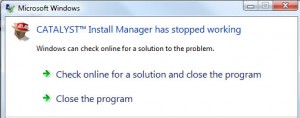
Catalyst Crash
Step 1. Close all ATI services/processes in task manager (control+alt+delete)
Step 2. Download and run “KB961894 – VC++ Post 2005 SP1 Redistributable” this resolves many issues that people have had. Even if you think you have installed this before, install it again, as many times this is corrupted. Select ENU (vcredist_x86.exe) for 32bit OR ENU (vcredist_x64.exe) for 64Bit.
Step 3. Download, install and run the Microsoft Installer CleanUp Utility. I know this sounds weird but this can solve a lot of the problems. Use it to uninstall catalyst.
Step 4. Download and install CC Cleaner. Run it a few times.
Reboot and try now!
Note: You may need to do this in safe mode.
Another Fix
1. Go to start -> run -> cmd (use administrative privileges)
2. Go to the folder you extracted the ati drivers (the default should be something like C:\\ATI\\SUPPORT\\ ***** ) *** = the folder inside support.
3. Navigate to the BIN (BIN64 for 64 bit OS users) folder (ex: users can type “cd c:\\ati\\support\\*****” to get to that location and then hit enter)
4. Now type atisetup.exe -Install -Output screen
Hopefully that worked.
If this solution does not work there is another more elaborate solution on Driver Heaven that you can try.
Tags: Catalyst, Fix, Install Manager
[…] here on how to fix the “Catalyst Install Manager has stopped working” error message. […]
[…] a quick notice. I have updated the “Catalyst Install Manager has stopped working (RESOLVED / Solution / Fixed)” article. I fixed the link. I am glad to hear that this article has been so helpful to you […]
[…] a quick notice. I have updated the “Catalyst Install Manager has stopped working The RESOLVED Fixed Solution” article. I updated the article slightly. I am glad to hear that this article has been so […]
[…] the drivers and/or Catalyst Installer keeps crashing when you try to install them? You may view my “Catalyst Install Manager has stopped working The RESOLVED Fixed Solution article here. […]
This tip never gets old.
It solves everything, heck Im sure if you applied this page to the world we would have utopia before the day is over.
[…] Re: 'catalyst install manager has stoppeed working' I see this thread keeps getting brought up so I wanted to leave a fix here since it seems to be at the top of google. I followed the tutorial here and it worked out really well for me. The issue seems to be the c++ runtimes for me anyways. Fix Catalyst Install Manager has stopped working Error Message | Geek Montage […]
[…] you upgrade if you can! For those of you who have install issues, please see my thread “Catalyst Install Manager has stopped working The RESOLVED Fixed Solution […]
[…] Has your catalyst install manager stopped working? No worries! It’s easy to fix. Check out How to Fix Catalyst Install Manager for how to fix […]
Life Saver! I never comment on blogs but this was so helpful I had to. Thank you very, very much!
Hi Kyle. I am glad that this tutorial helped you!
[…] trouble installing AtI Catalyst? You can view our tutorial on how to fix “Catalyst Install Manager has stopped working” here. […]
Big ups! Big ups!
Great info – many thanks!
[…] trouble installing AtI Catalyst? You can view our tutorial on how to fix “Catalyst Install Manager has stopped working” here. […]
Great tip, got my 4870×2 installed in win7 x86 after tearing my hair out for an hour.
Nice! Step 2 did the trick for me. Kudos!
Step 2 for me, too, on Windows 7 Ultimate 64-bit.
I noticed that the install included a VS2008 sp1 update as well, perhaps similar to the VS2005 fix.
Step #2 did the trick for me as well, Windows 7 Professional 64-bit.
Thanks!
Wow.. thanks a lot. Step 2 did the trick… nice 🙂
Thank you so much for explaining how to do it in the command prompt, as that solution worked flawlessly for me! Stupid ATI!
I have another fix, just incase this don’t work:
try to install catalyst, even if it breaks.
go to the device manager, and find the old driver.
click update, and opt to manually find the files, then go the the ATI folder
then it should be the /support/packages/drivers
let windows find the files… it will do some wierd stuff like change resolutions for a few minutes… but it worked find on my gateway. only good for updated the driver… but really, who actually uses catalyst?
[…] revealed that I wasn’t the only one with the problem either. I ultimately stumbled upon a post that said I needed to install a Visual C++ redistributable component. After installing the […]
Worked for me, though your MS installer cleanup link no longer points to it. I ended up just skipping that step; either step 1 or 2 was the problem; I already have and swear by copious CCleaner usage.
Yeah number 2 worked fine for me, finally updated my driver 🙂 Cheers
[…] Install Manager has stopped working" while trying to install the updated drivers, then refer to my "Catalyst Install Manager has stopped working" article to fix the […]
Step #2 worked for my on Vista 32-bit. Didn’t have to reboot or anything. Many thanks!
Yep, Step #2 worked for me also. I’m very grateful. This problem had been driving me mad.
[…] can download ATI Catalyst 9.12 here. If you have the infamous "Catalyst Install Manager has stopped working" error message, click here to learn how to fix […]
YES!!!!!!!!!!!!!!!!!!!!!!!!!!!!! THANK YOU FOR STEP 2!!!!!!!!!!
Step 2 Worked! Many Thanks!!!!!!!! 😀
Thank you very much. This solved a lot of head scratching and ended a whole lot of frustration. Cheers!
Thank you very much for this post! I have spent nearly 7 hours trying to figure out why my drivers would not install and this was the solution. You are a phenomenal human being.
Step 2 worked. Thank you SOOOOO much. Now I can use my 2 5770s correctly again. I would donate money to you if I could 😀
“Another fix” worked fine. Thank you!!!!
You are a god among men. And now i am forever indebted to you. Thank you
Hey man, you´re the best. Thanks for sharing this solution.
Ei cara, você é o melhor. Obrigado por compartilhar esta solução
Abraços
grazie!! grazie!! funziona!!! non potevo fare l aggiornamento 11.9 ed 11.10 della scheda video 5770 ati radeon 1gb asus.
ma grazie a te seguendo le istruzioni dettagliate come ha scritto sopra, ho risolto il problema!!!
p.s stavo per impazzire 🙂
ciao!!
DUDE! Thanks. You’re freaking awesome! It really worked! SWEET JESUS!